Clue Tools / De-centralized privacy tools and more — free for personal use
File Sender

Send an encrypted file to anyone.

The file is encrypted on the sending PC before it is uploaded. Free to use, and no account is required.

Drop a file here
The file is encrypted on this PC before it is uploaded.
📎
Or drop a file here

A single-use download link is created as soon as the upload finishes. It stays valid for 72 hours, or until the file has been downloaded once.

Security

Your data is protected from the site itself with client-side encryption

No data leaves your browser unencrypted; no password leaves your browser, period.

Encrypted before it is uploadedThe browser creates the key and encrypts the file in full before the upload begins.
The key is not sent to this siteIt is held in the part of the link that browsers keep locally and do not send.
Single use by designOnce the file has been downloaded, it is deleted and the link stops working.
No account requiredThere is nothing to register and nothing to sign in to.
Windows desktop application

For larger files, and for sending regularly

In a browser, the file needs to be decrypted fully in memory upon receipt, which sets a practical maximum of around 2 GB on most PCs. That is a limitation of the browser rather than of this site. The Windows application works outside the browser and has no such limitation.
Files larger than 2 GBIn a browser the maximum comes from the memory available to it, not from this site. The Windows application has no such limitation.
Queue whole foldersTransfers can also be made in a browser, but queueing entire folders is less convenient than in the application.
Transferred directlyThe file passes straight from one PC to the other and is not stored in between.
Free for personal useBoth web transfer and desktop application are free for personal use. Organizations begin with an unlimited two-week trial.
Download for Windows

Windows 10 and 11  ·  no account required  ·  free for personal use

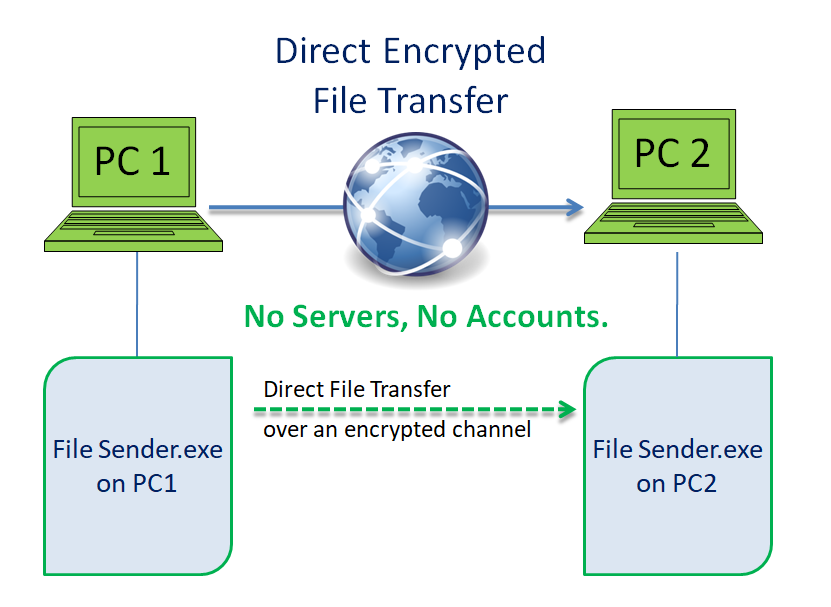
Two computers transferring a file directly over an encrypted channel
The application sends straight from one computer to the other. No server holds the file.
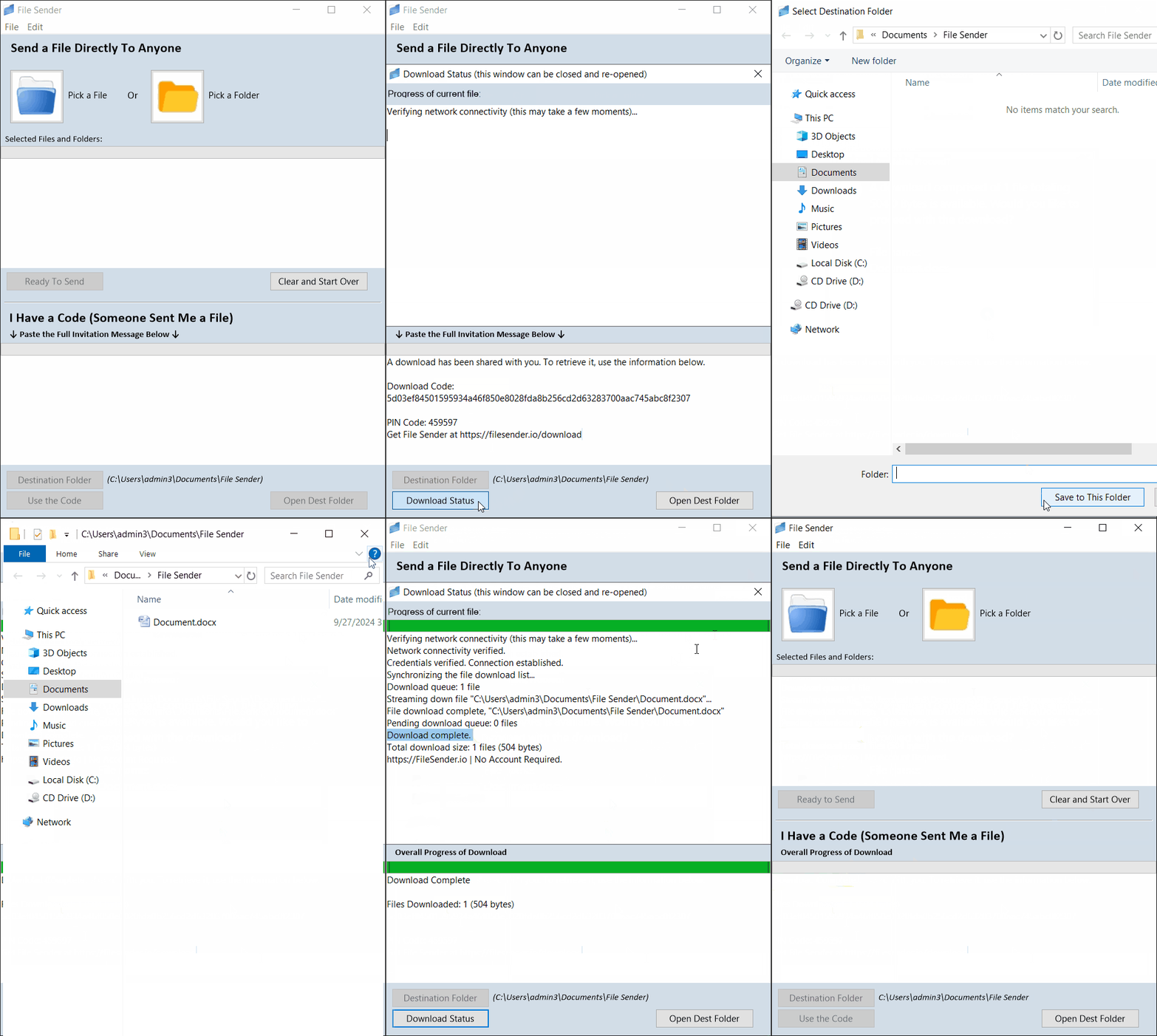
Sending a file with the File Sender application
Sending: pick the file, click Ready to Send, pass on the invitation text.
Receiving a file with the File Sender application
Receiving: paste the invitation text into I have a code, then Use the Code.
Questions

Common questions

Is there a limit on file size?
In a browser, the file needs to be decrypted fully in memory upon receipt, which sets a practical maximum of around 2 GB on most PCs. That is a limitation of the browser rather than of this site. The Windows application has no such limitation.
How long does a download link stay valid?
Seventy-two hours, or until the file has been downloaded once, whichever comes first. After that the stored file is deleted and the link stops working.
Does the recipient need anything?
Only the link. There is nothing for the recipient to install and no account to create.
Can this site read the files it carries?
No. The file, its name and any accompanying message are encrypted before the upload begins, and the key that would decrypt them is not sent to this site.
Is an account required?
No. Neither web browser, nor desktop application requires registration or a sign-in.
The rest of the family

More tools, built to the same standard

Each one does a single job properly, in the same plain language, under the same license, with no accounts anywhere.

Claim Disk

claimdisk.com
Windows appFree for personal use

Reads the drive’s own file table instead of walking folders, so the whole disk appears quickly, sorted by size. Delete, move and rename from the same window, with a running total of the space reclaimed.

Visit claimdisk.com →

LAN Fixer

lanfixer.com
Windows appFree for home use

Shows the devices on your network in about thirty seconds, explains in plain English what is wrong, and fixes it in one click — with a link straight to your own router’s security advisories and firmware.

Visit lanfixer.com →

My PC Direct

mypc.direct
Windows appNo account

Reach your own PC from anywhere over a direct, encrypted channel between the two machines, using credentials of your own choosing, with no provider or service in the middle.

Visit mypc.direct →

Map Blocker

mapblocker.com
Windows appFree for personal use

Draws the connections your PC makes on a map of the world, shows which program made it, and blocks any address, region or whole country that has no business being there.

Visit mapblocker.com →

Sending Pics

sending.pics
Windows appFree for personal use

Hand a whole gallery of photos and videos to family directly from your computer, using one-time codes that expire on their own and can be revoked at any moment.

Visit sending.pics →

Header Scanner

headerscanner.com
Web toolNothing to install

Paste an email header to trace where the message really came from — every hop, by country and address — and decode what the obscure header codes actually mean.

Visit headerscanner.com →

Message Link

textme.im
Web toolNo account

Send a private message as a link that can be opened once and then disappears.

Visit textme.im →

Insta Chat

instachat.im
Web toolNo account

Start a private conversation from a single link, encrypted in the browser rather than on a server, with no account and no registration for either side.

Visit instachat.im →

Protected Chat

protected.chat
Web toolNo account

A one-time encrypted conversation that opens from a link. No registration and no history.

Visit protected.chat →

Free for personal use, all of them. Business, government and non-profit use begins with a free two-week trial.